iPodTouchMaster.com

Mastery of the iPod Starts Here

RSS Feeds
  • Home

Jailbreak 3.0.x (iPhone 3G) – Windows


These are instructions on how to jailbreak your iPhone 3G on the 3.0.x iPhone firmware using RedSn0w for Windows. The Mac version of this tutorial is here. The 2G version of this tutorial is here

This tutorial can be used to jailbreak before applying the UltraSn0w unlock.

** If you would like to jailbreak on the 3.0.1 firmware you can follow these exact instructions; however, in Step Two restore using this 3.0.1 iPhone firmware file instead of the 3.0 one. Continue with the instructions as indicated.**

Watch the Video!
For your convenience this tutorial is available in video format also. Click the Watch It button to view the tutorial!

Step One
Create a folder on your desktop called Pwnage

Download RedSn0wfrom here or here and place it in the Pwnage folder. Likewise, download the latest 3.0 firmware from below and place it in the same folder.

3.0.0 (3G): iPhone1,2_3.0_7A341_Restore.ipsw

Extract the RedSn0w zip file to the Pwnage folder.
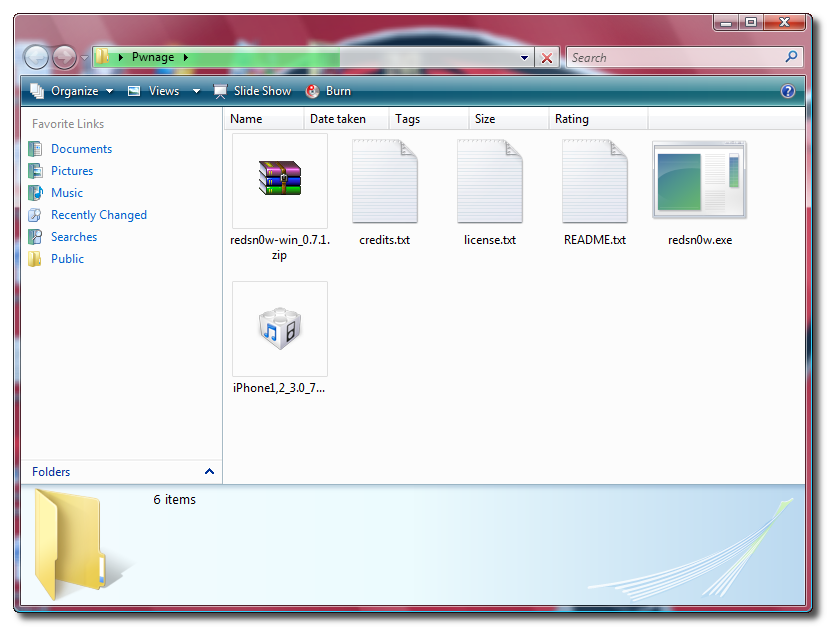
Step Two
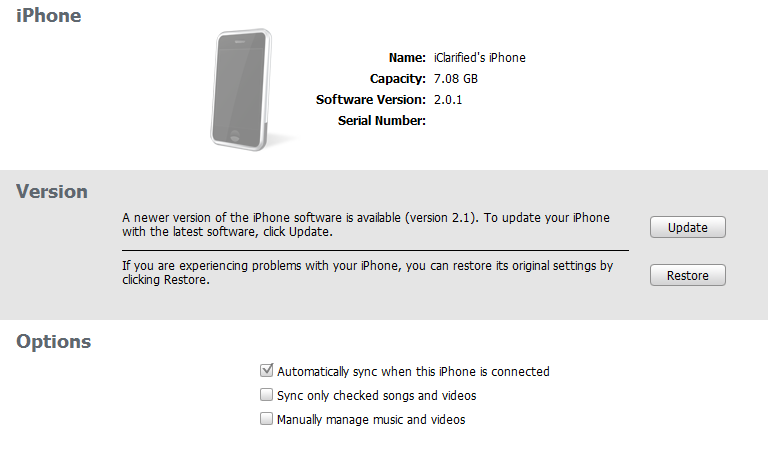
Connect your iPhone to the computer and launch iTunes.

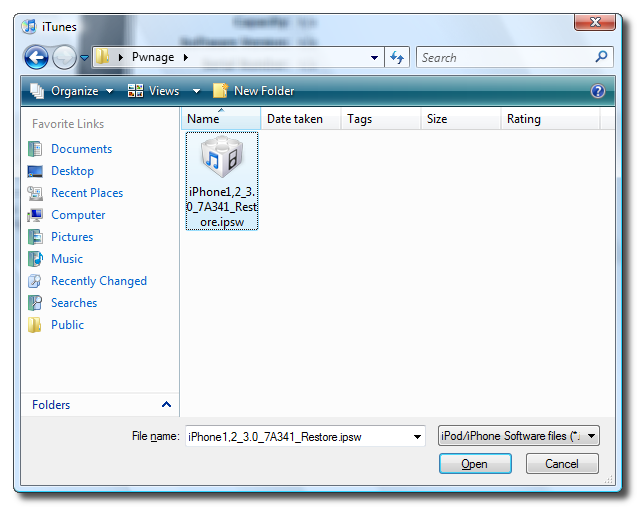
Select your iPhone from the list of devices on the left. Now hold down shift and click the Restore button. Restore is preferred as it won’t create any wasted space on your iPhone.
Navigate to the Pwnage folder on your desktop and select the firmware ipsw. Click the Open button to continue.
Step Three
Once iTunes has finished updating your iPhone to the desired firmware you may launch redsnw0w.exe from the Pwnage folder on your desktop.

Step Four
Once RedSn0w opens click the Browse button
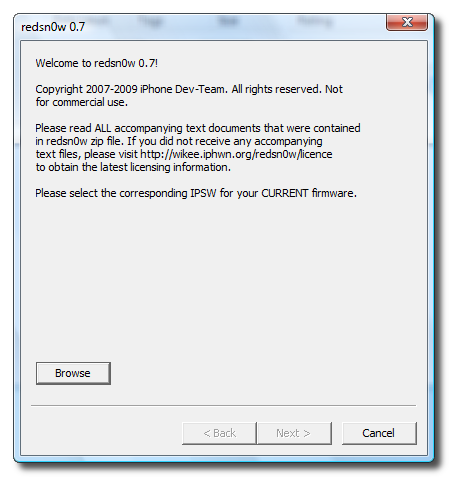
Step Five
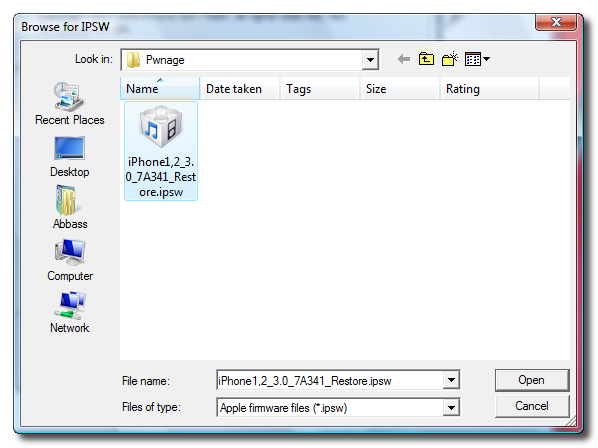
Select the firmware ipsw we placed in the Pwnage folder on our desktop then click Open
Step Six
Once the firmware has been verified click the Next button to continue.

Step Seven
Make sure Cydia is selected and click the Next button.

Step Eight
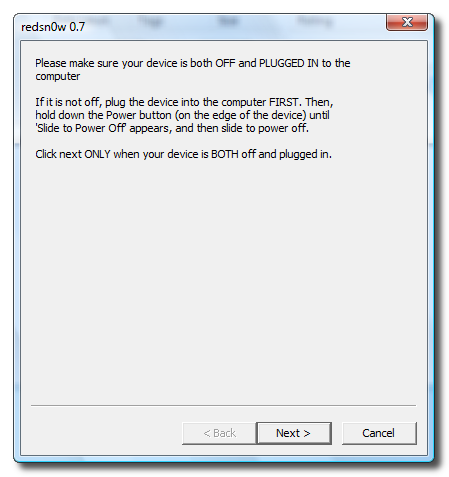
Please plug your iPhone into the computer and make sure its OFF then click the Next button
Step Nine
RedSn0w will now guide you through the steps to get into DFU mode.

Hold down both the Home button and the Power button for 10 seconds.
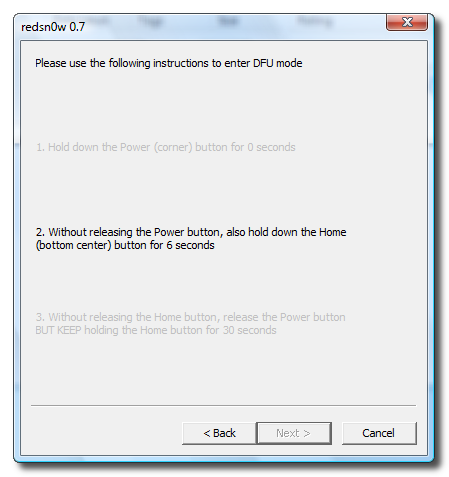
Release the Power button and continue holding the Home button until RedSn0w detects the device.

Step Ten
Your iPhone will now reboot

Step Eleven
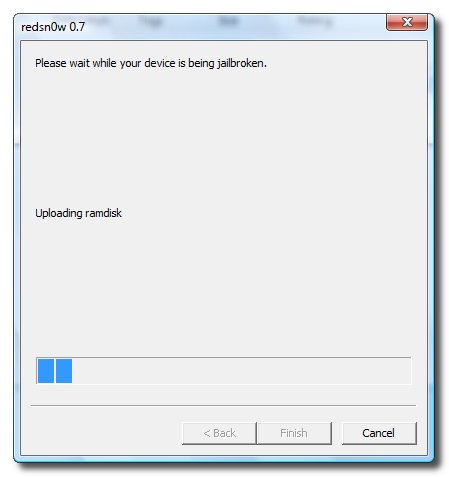
RedSn0w will then begin uploading the new RAM Disk.
Step Twelve
Once this is complete you will be notified that RedSn0w is done. Click the Finish button.
When your iPhone finishes reboot (5 minutes or so). It will be jailbroken with Cydia on the SpringBoard.


If this tutorial needs to be updated please let us know here


  • Related Posts
  • Comments (1)
  • #1 written by aconn
    September 28, 2009 - 5:54 pm
    Reply Quote

    can i restore my iphone 3g after i jailbreak it using this??

Cancel Reply

No trackbacks yet.

Enable Tethering on 3.1.2 iPhone 3G, 3GS

November 13, 2009 - 10:22 am

Tags: 3.1.2, 3GS, Enable Tethering, iPhone 3G
Posted in Uncategorized | 1 comment

These are instructions on how to patch the CommCenter of your 3.1.2 iPhone 3G, 3GS to enable Internet tethering. Warning: These are advanced instructions and are not suggested for beginners. Prerequisites: You must be jailbroken on the iPhone 3.1.2 firmware. You need to have SSH installed and you need to know the IP Address of [...]

Unlock iPhone 3G and3GS – BlackSn0w

November 13, 2009 - 10:19 am

Tags: 3GS, BlackSn0w, iPhone 3G, Unlock
Posted in Uncategorized | No comments

  • Links

  • FREE iPod Touch

    Check out these Guides to find out how you can get a FREE iPod Touch 8GB, 32GB, or 64 GB!!


    Click One:

  • iPod Touch / iPhone / iPad Firmware

    After downloading a firmware, you can shift-click (PC) or option-click (Mac) the Restore or Update button in iTunes. A file window will open and let you choose the downloaded ipsw-file.

    iOS 4 Direct Download Links:
    • iPhone 3G
    • iPhone 3G S
    • iPhone 4
    • iPod touch 2G
    • iPod touch 3G
  • Recent Posts

    • New Windows Version of iPhoDroid Installs Android on Your iPhone With One Click
    • You CAN Make Your Own Ringtones in iTunes 10
    • Apple Posts iOS 4.1 GM Seed for Developers
    • Apple Introduces iTunes 10 With Ping Social Music Network
    • Myth behind Downgrading iOS 4.0.2 to iOS 4.0.1 without SHSH Blobs
    • How To Downgrade Your iPhone From iOS 4.0.2 to iOS 4.0.1/iOS4 Without SHSH Blobs [Windows]
    • How To Downgrade Your iPhone From iOS 4.0.2 To iOS 4.0.1/iOS 4 Without SHSH Blobs [Mac]
    • How to Setup Push Hotmail on Your iPhone
    • How To Use iPhone While It Syncs With iTunes Using Synchronicity
    • How To Boost Battery Life On Your iPhone 3G, iPhone 3GS & iPhone 4
  • Guides

    • 3.0 Firmware Downloads
    • Access Over 180 Apps or WebClips in Spotlight (iPhone 3.0)
    • Apps Download Page
    • Backup and Restore Your Cydia Applications – Using PkgBackup
    • Check the Bootrom Version of Your iPhone (Mac)
    • Check the Bootrom Version of Your iPhone (Windows)
    • Connect and Use a Bluetooth Keyboard With Your iPhone
    • Crack 3.0 App’s with APPCRACK LiTE
    • Create A Custom iOS 4 Firmware Using PwnageTool 4.0 [video]
    • Create Custom Jailbreak Firmware 3.1.3 – Using PwnageTool 3.1.5 [Mac]
    • Create Custom Ringtones for an iPhone (Mac)
    • Create Custom Ringtones for an iPhone (Windows)
    • Display 11 or more Pages of Apps
    • Downgrade From FW 3.1 to 3.0 (iPhone 3GS)
    • Downgrade iOS 4.1 to iOS 3.1.2/3.1.3/4.0 On iPhone 3GS[Windows/Mac]
    • Downgrade iPhone 3GS Using a Cydia Saved SHSH [Windows]
    • Earn a FREE iPod Touch 8GB, 32GB, or 64 GB!!
    • Fix Push Notifications on Jailbroken 3.0 iPhone 2G
    • Free iPod Touch or iPad!! – PrizeBulb.com
    • Guide To Getting A FREE iPod Touch (8, 32, or 64 GB)
    • How To Downgrade iOS 4 : iPhone 3GS
    • How to End Task or Force Quit an Application
    • How to Get a FREE iPod Touch 8GB, 32GB, or 64 GB!!
    • How To Install/Uninstall a .deb File
    • Install Android on Your iPhone 2G, 3G [iPhoDroid]
    • Jailbreak (iPhone 3GS) – Mac
    • Jailbreak (iPhone 3GS) Using PurpleRa1n – Mac
    • Jailbreak 3.0 (iPhone 3GS) Using RedSn0w – Windows
    • Jailbreak 3.0 (iPhone 3GS) Using RedSn0w – Mac
    • Jailbreak 3.0 (ipod touch) – PC
    • Jailbreak 3.0.x (iPhone 3G) – Windows
    • Jailbreak 3.1 (iPhone 3G) Using PwnageTool – Mac
    • Jailbreak iOS 4 On iPhone 3G/3GS Using Sn0wbreeze – [Windows]
    • Jailbreak iPhone 2G 3G 3GS OS 3.1.2 – Using Sn0wbreeze
    • Jailbreak iPhone 2G 3G 3GS OS 3.1.3 – Using Sn0wbreeze
    • Jailbreak iPhone 3GS Using PwnageTool – Mac
    • Jailbreak iPhone and iPod Touch Using BlackRa1n – Windows
    • Jailbreak OS 3.1.2 (iPhone 3GS) Using RedSn0w – Mac
    • Jailbreak Your iPhone 2G/3G OS 3.1.3 – Using Redsn0w
    • Jailbreak Your iPhone 3G OS 3.1.3 – Using PwnageTool (Mac)
    • Jailbreak Your iPhone 3G Using PwnageTool (Mac) [4.0]
    • Jailbreak Your iPhone 3G Using RedSn0w (Mac) [4.0]
    • Jailbreak Your iPhone 3G Using RedSn0w (Windows) [4.0]
    • Jailbreak Your iPhone 3Gs Running iOS 4 GM With PwnageTool [video]
    • Latest Jailbreak | iPod Touch & iPhone | Firmware 3.0.x
    • Make your own iPhone Ringtone – PC
    • Multitasking on Your iOS 4 iPhone or iPod touch
    • Password Protect Individual iPhone Apps
    • Put DVD Movies Onto Your iPod Touch
    • Restore iPhone 3GS to 3.1.2 – Using SSH [Windows]
    • Set a Custom SMS Alert Tone for Incoming iPhone Text Messages
    • Setup Google Sync for Calendars, Contacts, and Push Gmail
    • Should You Update iTunes To v8.2?
    • Tethering on 3.1.2 iPhone 3G/3GS
    • Unlock iPhone 3GS Using PurpleSn0w
    • Unlock the iPhone 3G, 3GS on iPhone OS 3.1.3 & 4.0 Using Ultrasn0w
    • Unlock/Jailbreak 3.0.x (iPhone 2G) Using RedSn0w – Windows
    • Unlock/Jailbreak iPhone 2G OS 3.1.2 – Using Blackra1n
    • Unlock/Jailbreak OS 3.1.2 (iPhone 2G) Using RedSn0w – Mac
    • Unlock/Jailbreak Your iPhone 2G OS 3.1.3 – Using PwnageTool (Mac)
    • Upgrade Jailbroken iPhone 3GS to 3.1 Firmware
    • Use Your iPhone as a USB Drive
    • Using Folders on Your iOS 4 iPhone or iPod touch
    • Using PwnageTool 4.01 to get iBooks working on jailbroken iOS 4
    • Wireless Jailbreak (iPod Touch 2G)
  • College Students!

    If you're a college student, I think CourseHero.com could really help you. They have millions of study materials (lecture notes, past exams, study guides, etc...) and hundreds of on demand tutors who answer any of your questions anytime, fast, and for really low prices. Plus, they offer a better grades guarantee!

    Check em Out Here and use my special savings link: http://www.coursehero.com/?savings=45

  • Android Boss News

    • My Droid X
    • The Best Android Apps for Your Car
    • Awaz Apni :Google Nexus One: Android 2.2 Froyo Build FRG33 Leaks
    • Generic and untouched 2.1
    • Generic and untouched 2.1
  • Archives

    • September 2010
    • August 2010
    • July 2010
    • June 2010
    • May 2010
    • April 2010
    • March 2010
    • February 2010
    • January 2010
    • December 2009
    • November 2009
    • October 2009
    • September 2009
    • August 2009
    • July 2009
    • June 2009
  • Meta

    • Log in
    • Entries RSS
    • Comments RSS
    • WordPress.org
  • Recent Comments

    • John S on Apps Download Page
    • Chris Kim on Set a Custom SMS Alert Tone for Incoming iPhone Text Messages
    • Aric on Myth behind Downgrading iOS 4.0.2 to iOS 4.0.1 without SHSH Blobs
    • Jonathan on Auto3G: Extend Your iPhone’s Battery Life By Automatically Turning Off 3G When You Don’t Need It
    • david on Jailbreak iPhone and iPod Touch Using BlackRa1n – Windows
Mystique theme by digitalnature | Powered by WordPress
RSS Feeds XHTML 1.1 Top